Selenium is one of the most widely used automation testing tools for web applications. Companies use it to automate repetitive testing tasks, improve testing speed, and reduce manual effort. Because of its popularity, recruiters frequently ask selenium interview questions and answers in software testing interviews for both freshers and experienced professionals. Most interviews focus on Selenium WebDriver, locators, waits, frameworks, TestNG, and real-time automation scenarios. If you understand the core concepts properly and practice coding regularly, you can answer interview questions with confidence. This guide covers important Selenium questions to help you prepare effectively for automation testing interviews.
Basic Selenium Interview Questions and Answers for Freshers
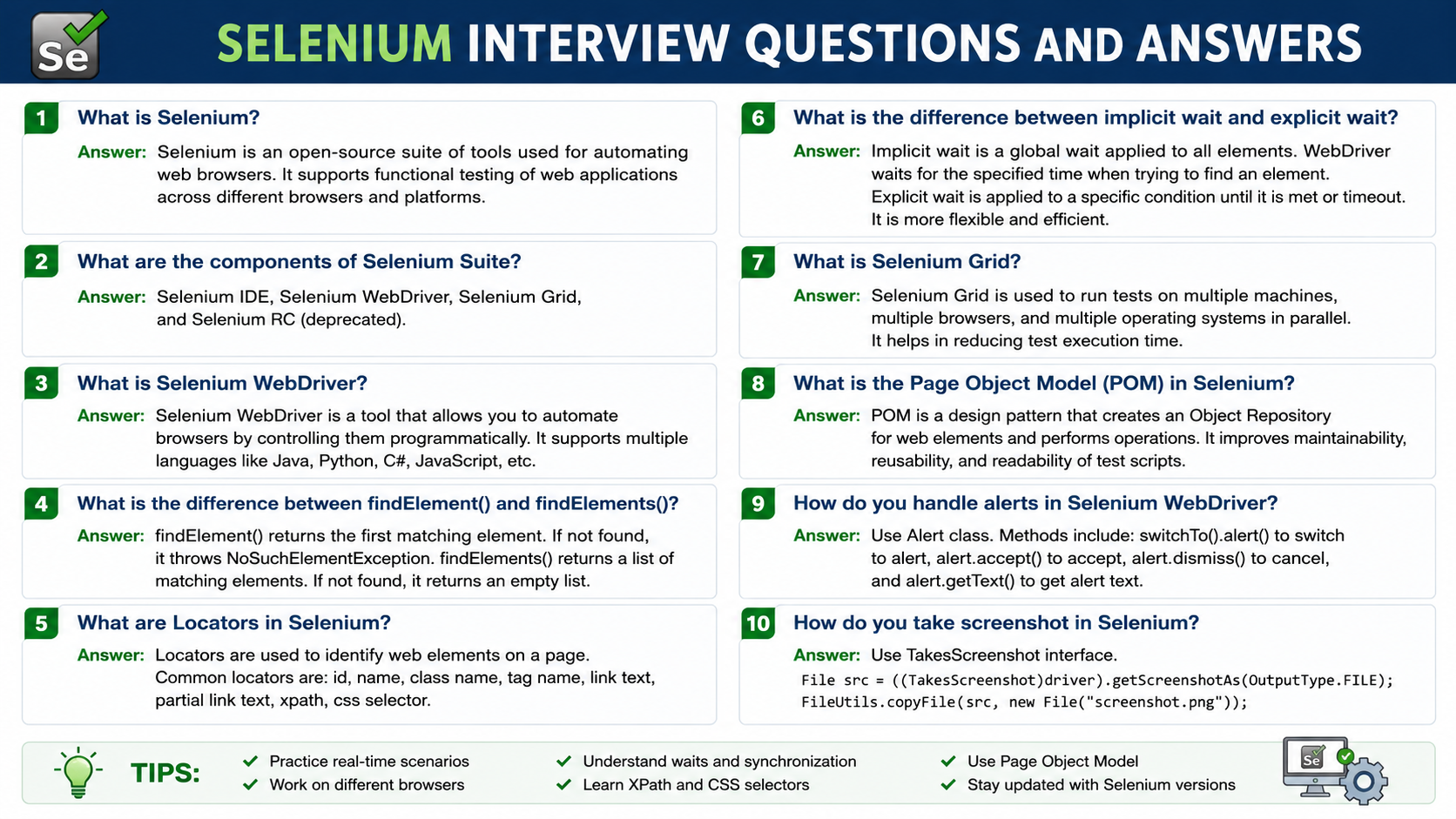
1. What Is Selenium?
Selenium is an open-source automation testing tool used for testing web applications. It helps you automate browser activities such as clicking buttons, entering text, validating page titles, handling dropdowns, and checking website functionality automatically.
Selenium is widely used because it supports multiple browsers like Chrome, Firefox, Edge, and Safari. It also supports programming languages such as Java, Python, C#, and JavaScript. Most companies use Selenium for regression testing and cross-browser testing because it reduces manual effort and saves testing time.
2. What Are the Main Components of Selenium?
Selenium consists of four important components:
- Selenium IDE: Selenium IDE is a browser extension used for recording and playing back test cases. It is mainly useful for beginners and quick test creation.
- Selenium WebDriver: WebDriver is the most important component of Selenium. It directly interacts with browsers and automates user actions like clicking, typing, scrolling, and navigation.
- Selenium Grid: Selenium Grid is used for parallel testing. It allows you to run the same test cases on multiple browsers and machines at the same time.
- Selenium RC: Selenium Remote Control was an older Selenium tool used before WebDriver. It is now outdated because WebDriver provides better speed and performance.
3. Why Is Selenium Popular in Automation Testing?
Selenium is popular because it offers flexibility and supports modern testing requirements. It is free to use, making it a preferred choice for startups as well as large companies. Some major reasons behind Selenium’s popularity are:
- Open-source and free
- Supports multiple browsers
- Works with different operating systems
- Compatible with many programming languages
- Supports automation frameworks
- Easy integration with Jenkins, Maven, and TestNG
- Useful for continuous integration and continuous testing
Its strong community support also makes troubleshooting easier for testers.
4. What Is Selenium WebDriver?
Selenium WebDriver is a browser automation tool that directly communicates with the browser without using any intermediate server. It performs actions exactly like a real user interacting with a website.
With WebDriver, you can:
- Open websites
- Click buttons
- Enter form data
- Handle alerts and popups
- Validate web elements
- Perform mouse and keyboard actions
WebDriver is faster and more stable compared to older Selenium tools because it uses browser-specific drivers such as ChromeDriver and GeckoDriver.
5. Which Browsers Are Supported by Selenium?
Selenium supports almost all major browsers used for web testing, including:
- Google Chrome
- Mozilla Firefox
- Microsoft Edge
- Safari
- Opera
This browser compatibility allows testers to perform cross-browser testing and verify whether a web application behaves correctly across different environments.
6. Which Programming Languages Can Be Used With Selenium?
Selenium supports multiple programming languages, which gives developers and testers flexibility while creating automation scripts.
Popular Selenium-supported languages include:
- Java
- Python
- C#
- JavaScript
- Ruby
- PHP
Among these, Java with Selenium is the most commonly used combination in automation testing projects.
7. What Are Locators in Selenium?
Locators are methods used to identify web elements on a webpage. Selenium uses locators to find buttons, links, input fields, checkboxes, and other elements before performing actions on them.
Common Selenium locators include:
- ID
- Name
- XPath
- CSS Selector
- Class Name
- Tag Name
- Link Text
- Partial Link Text
Choosing the correct locator is important because unstable locators can cause automation script failures.
8. What Is XPath in Selenium?
XPath is a locator strategy used to identify elements in an HTML document using XML path expressions. It is commonly used when elements do not have unique IDs or names.
XPath helps testers locate:
- Dynamic elements
- Complex elements
- Nested elements
There are two types of XPath:
- Absolute XPath
- Relative XPath
Relative XPath is more commonly used because it is shorter and less sensitive to webpage structure changes.
9. What Is the Difference Between XPath and CSS Selector?
Both XPath and CSS Selector are used for locating elements, but they work differently.
| XPath | CSS Selector |
| Can move forward and backward in DOM | Moves only forward |
| Supports complex navigation | Faster and simpler |
| Uses XML path syntax | Uses CSS syntax |
| Slightly slower in some cases | Generally faster |
CSS Selector is usually preferred for speed, while XPath is useful for handling complex element structures.
10. What Is Automation Testing?
Automation testing is a testing method where software tools execute test cases automatically instead of humans performing them manually.
It is mainly used for:
- Regression testing
- Smoke testing
- Repetitive test execution
- Cross-browser testing
- Large-scale testing projects
Automation testing improves accuracy, reduces repetitive manual work, and saves execution time in long-term projects.
Selenium WebDriver Interview Questions
What Is the Architecture of Selenium WebDriver?
Selenium WebDriver follows a client-server architecture. When you write automation scripts in languages like Java or Python, the commands are sent to browser drivers such as ChromeDriver or GeckoDriver. These drivers communicate with the actual browser and perform the requested actions.
The workflow is simple:
- Test script sends commands
- WebDriver converts commands into browser-specific instructions
- Browser driver executes the commands
- Browser returns the response
This direct communication makes Selenium WebDriver faster and more reliable than older Selenium tools.
12. What Is the Difference Between driver.close() and driver.quit()?
Both commands are used to close browsers, but their functionality is different.
| driver.close() | driver.quit() |
| Closes the current browser window | Closes all browser windows |
| Ends only the active session window | Ends the complete WebDriver session |
| Useful for multiple window handling | Used after complete test execution |
If your test opens multiple tabs or windows, driver.quit() is generally preferred at the end of execution.
13. What Is the Difference Between get() and navigate().to()?
Both methods are used to open URLs in Selenium, but there are slight differences.
| get() | navigate().to() |
| Loads a webpage directly | Used for browser navigation |
| Waits until page fully loads | Supports backward and forward navigation |
| Simpler method | More flexible |
Example:
driver.get(“https://example.com”);
driver.navigate().to(“https://example.com”);
14. What Are WebElements in Selenium?
A WebElement represents an HTML element on a webpage. Selenium uses WebElement objects to interact with buttons, text fields, links, dropdowns, and other page components.
Examples of actions performed on WebElements:
- click()
- sendKeys()
- getText()
- clear()
- isDisplayed()
WebElement loginBtn = driver.findElement(By.id(“login”));
loginBtn.click();
15. What Is the Difference Between findElement() and findElements()?
Both methods help locate elements on a webpage, but their return types are different.
| findElement() | findElements() |
| Returns a single WebElement | Returns a list of WebElements |
| Throws exception if element not found | Returns empty list if not found |
| Used for single elements | Used for multiple matching elements |
findElements() is commonly used for tables, lists, menus, and repeated elements.
16. What Are Browser Commands in Selenium?
Browser commands are methods used to control browser operations during automation testing.
Common browser commands include:
| Command | Purpose |
| driver.get() | Opens URL |
| driver.close() | Closes current browser |
| driver.quit() | Closes all browser sessions |
| driver.getTitle() | Gets page title |
| driver.getCurrentUrl() | Gets current webpage URL |
| driver.getPageSource() | Retrieves page source |
17. What Are Navigation Commands in Selenium?
Navigation commands help move between webpages during testing.
Important navigation methods:
- navigate().to()
- navigate().back()
- navigate().forward()
- navigate().refresh()
18. What Is the Difference Between sendKeys() and click()?
| sendKeys() | click() |
| Used to enter text into input fields | Used to click buttons, links, and elements |
| Accepts string values | Performs mouse click action |
| Mostly used with textboxes | Used with clickable elements |
driver.findElement(By.id(“email”)).sendKeys(“test@gmail.com”);
driver.findElement(By.id(“submit”)).click();
19. What Is the Purpose of getText() in Selenium?
The getText() method retrieves visible text from a webpage element. It is commonly used for validation and verification during automation testing.
String text = driver.findElement(By.id(“message”)).getText();
System.out.println(text);
This method is useful for checking:
- Success messages
- Error messages
- Labels
- Headers
- Notifications
20. What Is the Difference Between Verification and Validation in Testing?
| Verification | Validation |
| Checks whether product is built correctly | Checks whether correct product is built |
| Process-oriented | User-oriented |
| Includes reviews and inspections | Includes actual testing |
| Done during development | Done after development |
In Selenium automation, validation usually refers to checking application behavior through automated test scripts.
Selenium Advanced Concepts Interview Questions
21. What Is Page Object Model (POM) in Selenium?
Page Object Model, commonly called POM, is a design pattern used in Selenium automation frameworks. In this approach, every webpage is represented as a separate class, and all web elements and methods related to that page are stored inside that class.
The main goal of POM is to improve code readability, maintainability, and reusability.
For example:
- Login page elements are stored in a LoginPage class
- Dashboard elements are stored in a DashboardPage class
This structure makes automation frameworks cleaner and easier to manage.
Advantages of Page Object Model
- Reduces code duplication
- Makes maintenance easier
- Improves script readability
- Simplifies framework management
- Makes test scripts reusable
22. What Is Page Factory in Selenium?
Page Factory is an extension of the Page Object Model. It uses annotations like @FindBy to initialize web elements automatically.
Example:
@FindBy(id=”username”)
WebElement userName;
Instead of locating elements repeatedly, Page Factory initializes them automatically when the page class is created.
Benefits of Page Factory
- Cleaner code structure
- Better readability
- Faster element initialization
- Less repetitive coding
Although many modern frameworks still use standard POM, interviewers often ask Page Factory concepts.
23. What Is the Difference Between POM and Page Factory?
| Page Object Model | Page Factory |
| Uses normal WebDriver methods | Uses @FindBy annotations |
| Elements initialized manually | Elements initialized automatically |
| More coding required | Cleaner and shorter code |
| Better control over elements | Faster implementation |
Both approaches are used to build scalable Selenium automation frameworks.
24. What Is a Data-Driven Framework?
A Data-Driven Framework separates test data from test scripts. Instead of hardcoding values inside scripts, test data is stored externally in:
- Excel files
- CSV files
- JSON files
- Databases
This allows the same test case to run with multiple datasets.
Example
A login test can run with:
- Valid username/password
- Invalid username/password
- Empty credentials
Data-driven testing improves test coverage and reduces duplicate scripts.
25. What Is a Keyword-Driven Framework?
In a Keyword-Driven Framework, actions are defined using keywords instead of writing logic repeatedly in scripts.
Example keywords:
- Click
- OpenBrowser
- EnterText
- ValidateMessage
The framework reads these keywords from external files and performs actions accordingly.
Advantages
- Easier for non-programmers
- Better test management
- Reusable test steps
- Reduced coding effort
26. What Is a Hybrid Framework in Selenium?
A Hybrid Framework combines features of multiple frameworks such as:
- Data-driven framework
- Keyword-driven framework
- Page Object Model
Most companies use hybrid frameworks because they provide flexibility, maintainability, and scalability for large automation projects. Hybrid frameworks are commonly used in enterprise-level Selenium automation testing.
27. What Is TestNG in Selenium?
TestNG is a testing framework used with Selenium for test execution and reporting. It provides advanced features compared to JUnit.
TestNG supports:
- Test prioritization
- Parallel execution
- Grouping
- Assertions
- Reporting
- Data providers
It is widely used in Selenium automation frameworks.
28. What Are Important TestNG Annotations?
Annotations in TestNG control test execution flow.
| Annotation | Purpose |
| @BeforeSuite | Runs before suite execution |
| @BeforeTest | Runs before test execution |
| @BeforeMethod | Runs before each test method |
| @Test | Defines a test case |
| @AfterMethod | Runs after each test method |
| @AfterTest | Runs after test execution |
| @AfterSuite | Runs after suite completion |
29. What Is the Difference Between Assert and Verify?
| Assert | Verify |
| Stops execution if validation fails | Continues execution even if validation fails |
| Used for critical validations | Used for soft validations |
| Mostly used in TestNG/JUnit | Common in automation frameworks |
30. What Is the Difference Between Hard Assert and Soft Assert?
Hard Assert
Hard Assert immediately stops test execution if the condition fails.
Soft Assert
Soft Assert continues execution even if validation fails. All failures are reported at the end.
Example:
Assert.assertEquals(actual, expected);
SoftAssert soft = new SoftAssert();
soft.assertEquals(actual, expected);
soft.assertAll();
Selenium Interview Questions and Answers for 2 Years Experience
31. What Was Your Contribution to the Automation Framework?
In automation projects, responsibilities usually include creating reusable test components, maintaining locators, improving execution stability, and adding new test cases to regression suites. Testers also contribute to reporting, synchronization handling, and integration with tools like Jenkins and Maven.
Common contributions include:
- Creating reusable utility methods
- Maintaining Page Object classes
- Updating failed locators
- Adding screenshot capture functionality
- Improving test execution speed
- Supporting CI/CD execution
Interviewers usually expect practical examples from real projects rather than only framework definitions.
32. How Do You Handle Dynamic XPath in Selenium?
Dynamic XPath is used when web elements have changing attributes or IDs. In such situations, fixed XPath expressions may fail frequently, so functions like contains(), starts-with(), and text() are used to create flexible locators.
Example:
//input[contains(@id,’user’)]
This XPath works even if part of the element ID changes dynamically. Handling dynamic elements correctly is important because unstable locators are one of the biggest reasons for Selenium script failures.
33. How Do You Perform Data-Driven Testing?
Data-driven testing allows the same test case to run with multiple datasets. Instead of hardcoding values inside scripts, test data is stored externally in Excel files, CSV files, or databases.
In Selenium projects, Apache POI is commonly used for reading Excel data. This approach improves test coverage because the same script can validate multiple scenarios like valid login, invalid login, and blank fields without creating separate test cases.
34. How Do You Organize Selenium Test Scripts in Large Projects?
In large Selenium projects, test scripts are usually organized using reusable components and separate layers for pages, utilities, test data, and execution logic. Most automation teams follow a structured framework where web elements, reusable methods, reports, and test cases are maintained independently.
A common structure includes:
- Page classes for web elements
- Utility classes for waits and screenshots
- Test classes for execution
- External files for test data
- Reporting and logging modules
This type of organization improves maintainability and makes automation suites easier to scale as the application grows.
35. How Do You Generate Reports in Selenium?
Reports are generated using tools like Extent Reports, Allure Reports, and TestNG Reports. These reports provide execution details such as passed test cases, failed test cases, screenshots, and execution time.
In most automation frameworks, screenshots are automatically attached when test cases fail. Good reporting helps teams identify issues quickly and improves debugging efficiency.
36. How Do You Handle Synchronization Issues in Selenium?
Synchronization issues occur when Selenium executes faster than the application response time. To solve this problem, waits are used.
Explicit Wait is commonly preferred because it waits for specific conditions like element visibility or clickability. Proper synchronization improves test stability and reduces flaky test failures.
37. What Is the Difference Between findElement() and findElements()?
findElement() returns a single web element and throws an exception if the element is not found. On the other hand, findElements() returns a list of elements and returns an empty list if no elements are available.
findElements() is commonly used for:
- Tables
- Menus
- Repeated elements
- Lists
Understanding this difference is important for handling dynamic webpages.
38. How Do You Handle Dropdowns in Selenium?
Dropdowns are handled using the Select class in Selenium.
Example:
Select dropdown = new Select(driver.findElement(By.id(“country”)));
dropdown.selectByVisibleText(“India”);
The Select class provides methods like:
- selectByVisibleText()
- selectByValue()
- selectByIndex()
Dropdown handling is very common in form automation testing.
39. How Do You Capture Screenshots in Selenium?
Screenshots are captured using the TakesScreenshot interface. They are mainly used for debugging failed test cases and generating automation reports.
Example:
TakesScreenshot ts = (TakesScreenshot) driver;
Most frameworks automatically capture screenshots when failures occur.
40. What Is Your Role in the Automation Project?
For this question, interviewers expect practical answers instead of theoretical definitions. A typical answer includes:
- Writing automation scripts
- Maintaining test cases
- Executing regression suites
- Reporting bugs
- Updating locators
- Supporting framework maintenance
Candidates should explain their responsibilities clearly based on real project experience.
Selenium Interview Questions and Answers for 5 Years Experience
41. What Factors Do You Consider While Building an Automation Framework?
While designing an automation framework, the main focus is maintainability, scalability, reusability, and execution stability. A good framework should support easy script updates, parallel execution, external test data management, and detailed reporting.
Important considerations include:
- Reusable code structure
- Centralized configuration management
- Reporting and logging support
- Cross-browser execution capability
- CI/CD integration
- Stable synchronization handling
- Easy debugging and maintenance
A well-designed framework reduces long-term maintenance effort and improves overall automation efficiency.
42. How Do You Perform Parallel Testing in Selenium?
Parallel testing is used to reduce execution time by running multiple test cases simultaneously. Selenium Grid and TestNG are commonly used for this purpose.
For example, the same test suite can run on Chrome, Firefox, and Edge at the same time. Parallel execution is highly useful in large regression testing projects where execution time is critical.
43. How Do You Integrate Selenium With Jenkins?
Selenium is integrated with Jenkins for continuous integration and automated test execution. Whenever code changes are pushed to Git, Jenkins automatically triggers Selenium test execution.
After execution:
- Reports are generated
- Failed test cases are identified
- Notifications are shared with the team
This setup helps teams identify issues early in the development cycle.
44. How Do You Handle Flaky Test Cases?
Flaky test cases are tests that pass sometimes and fail randomly without actual application defects. These issues are commonly caused by synchronization problems or unstable locators.
To reduce flaky tests:
- Use Explicit Wait
- Avoid hardcoded waits
- Improve locator stability
- Add retry mechanisms
Stable synchronization is very important for reliable automation execution.
45. What Challenges Have You Faced in Selenium Automation?
Some common Selenium challenges include:
- Dynamic elements
- Browser compatibility issues
- Slow-loading applications
- Test maintenance
- Environment instability
Experienced candidates should explain how they solved these issues using frameworks, reusable methods, waits, and reporting tools.
46. How Do You Handle Cross-Browser Testing?
Cross-browser testing ensures that the application behaves correctly across multiple browsers. Selenium Grid is commonly used to execute scripts on Chrome, Firefox, Edge, and Safari simultaneously.
This process helps identify browser-specific issues and improves application compatibility across environments.
47. What Is CI/CD in Automation Testing?
CI/CD stands for Continuous Integration and Continuous Delivery. It automates code integration, test execution, and deployment processes.
In Selenium projects, Jenkins is commonly used to trigger automation suites automatically whenever code changes are committed.
48. How Do You Handle Test Data in Automation Projects?
Test data is usually managed using:
- Excel files
- CSV files
- JSON files
- Databases
Externalizing test data improves script reusability and simplifies maintenance in large projects.
49. What Reporting Tools Have You Used in Selenium?
Popular reporting tools include:
- Extent Reports
- Allure Reports
- TestNG Reports
These tools provide detailed execution summaries along with screenshots and logs for failed test cases.
50. How Do You Improve Automation Coverage?
Automation coverage is improved by identifying repetitive and high-priority test cases for automation. Regression, smoke, and data-driven scenarios are usually automated first.
Proper framework design and reusable components also help increase automation coverage efficiently.
Selenium Interview Questions and Answers for 7 Years Experience
51. How Do You Decide Whether a Test Case Should Be Automated?
Not every test case is suitable for automation. Usually, repetitive, stable, and business-critical scenarios are selected for automation.
Regression testing, smoke testing, and data-driven scenarios are ideal candidates for automation. Frequently changing features are usually avoided because maintenance effort becomes high.
52. How Do You Improve Automation Framework Scalability?
Framework scalability is improved using reusable and modular design principles. Large automation projects require frameworks that can support thousands of test cases without becoming difficult to maintain.
Scalability is achieved through:
- Reusable components
- Utility classes
- Parallel execution
- Proper reporting
- CI/CD integration
53. How Do You Manage Selenium Automation in Agile Projects?
In Agile projects, automation testing is closely connected with sprint activities. Automation scripts are updated continuously as new features are developed.
Smoke test suites usually run daily, while regression suites execute before releases. Jenkins pipelines help automate execution after deployments.
54. How Do You Ensure Stable Automation Execution Across Multiple Environments?
Automation scripts often behave differently across environments because of browser versions, server speed, test data differences, or configuration issues. To maintain stable execution, teams usually standardize browser settings, maintain dedicated test environments, and use proper synchronization methods.
Some common practices include:
- Using reusable wait methods
- Maintaining stable test data
- Running tests in isolated environments
- Keeping browser drivers updated
- Using configuration files for environment management
- Monitoring failed executions through reports and logs
Proper environment handling helps reduce false failures and improves automation reliability.
55. How Do You Handle Test Maintenance in Large Projects?
Test maintenance becomes challenging when applications change frequently. To manage this effectively, teams use:
- Page Object Model
- Reusable methods
- Centralized locators
- Utility classes
Good framework structure significantly reduces maintenance effort.
56. How Do You Review Automation Code?
Automation code reviews focus on:
- Reusability
- Coding standards
- Locator stability
- Exception handling
- Framework consistency
Code reviews help maintain automation quality and reduce future maintenance issues.
57. How Do You Measure Automation ROI?
Automation ROI is measured by comparing:
- Manual testing effort
- Execution time saved
- Defect detection improvement
- Maintenance cost
Organizations usually calculate ROI based on long-term regression testing benefits.
58. What Is Your Experience With API and UI Automation Together?
In many enterprise projects, API and UI automation are combined to improve test coverage. API testing validates backend functionality, while Selenium verifies frontend behavior.
This combined approach improves testing efficiency and reduces dependency on UI-only validation.
59. How Do You Handle Environment Issues in Automation?
Environment instability can cause false failures in automation testing. Teams usually manage this by:
- Using proper test environments
- Maintaining stable test data
- Monitoring server availability
- Implementing retry mechanisms
Environment management is important for reliable automation execution.
60. What Qualities Make a Strong Automation Tester?
A strong automation tester should have:
- Good programming knowledge
- Problem-solving skills
- Framework understanding
- Debugging ability
- Knowledge of CI/CD tools
- Understanding of testing concepts
Practical experience and clear understanding of real-time automation challenges are equally important for long-term success in automation testing.
Conclusion
These selenium interview questions and answers cover important topics ranging from Selenium basics to advanced automation framework concepts. Interviewers commonly ask about WebDriver, locators, waits, TestNG, reporting, synchronization, and real-time automation challenges. Understanding both theoretical concepts and practical implementation is essential for clearing automation testing interviews successfully. Regular coding practice and hands-on experience with frameworks can help candidates answer confidently during technical discussions. Whether you are preparing as a fresher or an experienced professional, these interview questions and answers can help improve your technical knowledge, boost interview confidence, and support long-term career growth in automation testing and quality assurance.